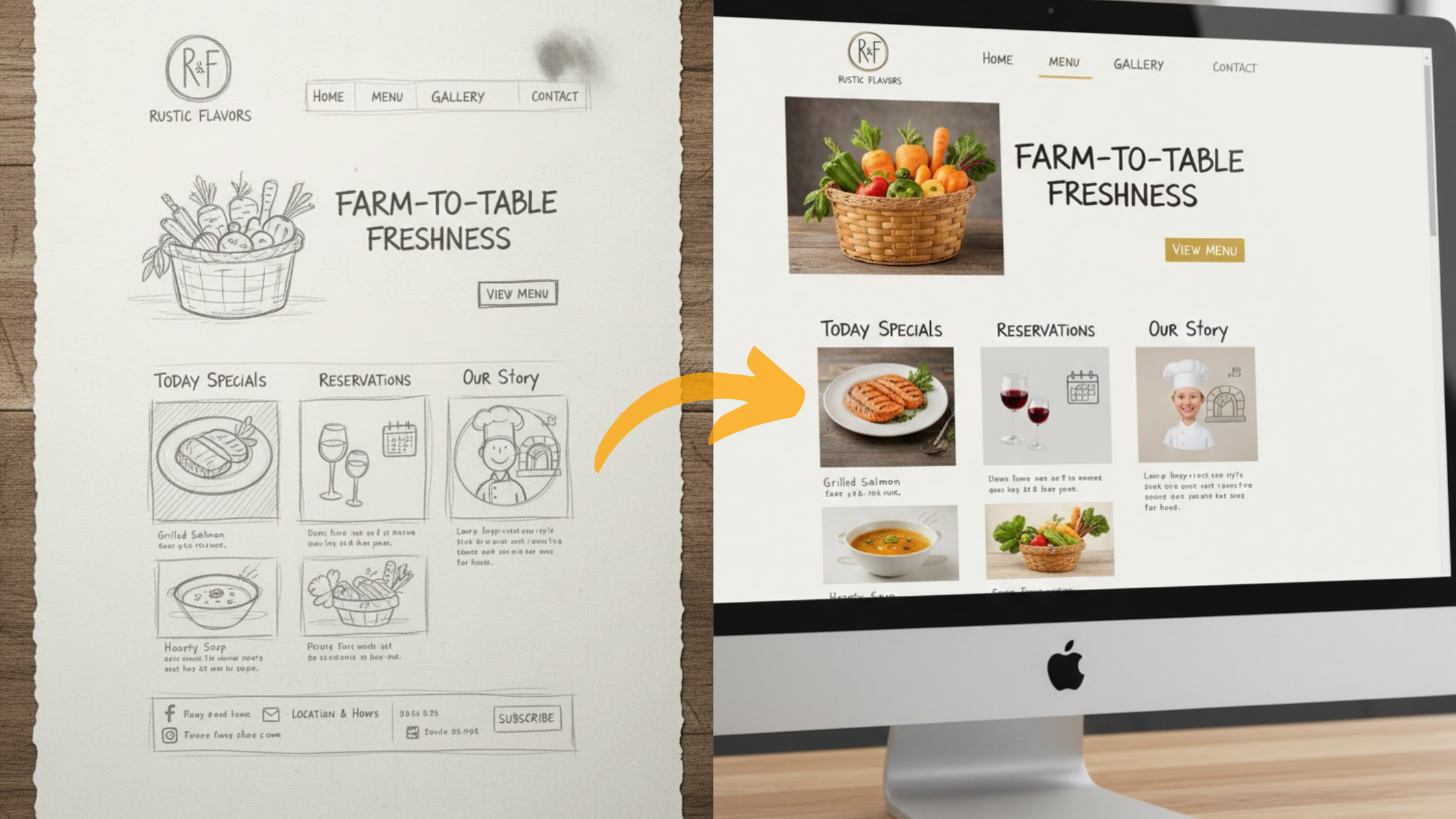
You may want to build a website but feel limited because you don’t know how to code. The good news is, you don’t need coding skills anymore.
Many small business owners, bloggers, and entrepreneurs face the same challenge.
They need a website quickly but lack the technical knowledge. Having an online presence today is essential for reaching customers, sharing ideas, or selling products.
Hiring a developer can cost thousands of dollars, and learning to code takes months.
That’s where WYSIWYG AI website builders make a difference. These tools let you drag and drop elements, while AI helps with smart features like design suggestions and content writing.
With them, creating a website becomes simple, fast, and even fun. No more struggling with HTML or CSS—just point, click, and build.
In this guide, we’ll show you the best WYSIWYG AI website builders for 2025.
We’ve researched the top options with a focus on ease of use for non-coders.
You’ll find clear reviews, helpful tips, and step-by-step guidance to launch your site today.
We’ll cover:
- Why these tools matter for beginners
- Key benefits and how to choose
- Top 10 reviews, starting with Olitt as the AI standout
- A quick comparison table
- Future trends and FAQs
By the end, you’ll know exactly which WYSIWYG AI website builder fits your needs. Let’s get started and turn your ideas into a real website—without the hassle.
Why WYSIWYG Website Builders Matter
WYSIWYG stands for “What You See Is What You Get.” It means you edit your website live, just like arranging furniture in a room.
You drag and drop text, images, or buttons, and the changes appear instantly—without any hidden code.
The website builder industry has grown rapidly. In 2025, the market is valued at over $2 billion and is expected to keep expanding steadily in the coming years.
This growth is driven by more people wanting to create websites, even though many give up because traditional tools can feel too complex.
For non-coders, WYSIWYG builders are a game-changer. Instead of paying developers $50–$200 per hour, you can build your blog, online shop, or portfolio in just a few hours.
Small businesses, in particular, save a lot. A custom-built website can cost more than $5,000, while these tools often cost less than $20 per month.
AI is making the process even easier. It can suggest layouts, generate text, and optimize images automatically.
By 2025, the majority of apps are being built with no-code tools, including websites, because they make technology accessible to everyone.
This opens the door for side hustles and small ventures without technical barriers.
These platforms also support your online success. They include built-in SEO features, mobile-friendly designs, and analytics to help you rank on Google and track visitors.
Considering that most online experiences start with a search, these features are vital.
Benefits of Using a WYSIWYG Website Builder
You save a lot of time. Instead of spending weeks coding, you simply drag and drop elements like images or buttons—no technical skills required. A website can be live within hours.
AI makes the process even smarter. It creates content, suggests designs based on your niche, and adjusts layouts for a polished look.
For example, type in “coffee shop site,” and it generates pages complete with menus and maps.
Costs remain low. Many platforms offer free plans or start under $20 per month, compared to thousands of dollars for professional developers.
Hosting, domains, and security are usually included, so there are no hidden bills.
Your site looks professional from the start. With hundreds of templates, you get sleek, mobile-friendly designs that automatically adapt to any device.
SEO is easier too. Built-in tools handle tasks like meta tags and keyword suggestions, helping you rank higher in search results and attract visitors without needing an expert.
Scaling is simple. As your business grows, you can add e-commerce, blogs, or booking systems.
Integrations like email marketing and social media connect seamlessly.
Take a real example: a freelance photographer builds a portfolio site, books sessions, and sells prints—all without coding. She launched in a single day and increased her bookings by 30%.
At Olitt, we see this every day. AI allows non-coders to launch quickly and focus on their passion instead of the tech.
Security comes built-in. Automatic updates, SSL certificates, and backups protect against hackers and data loss.
You also gain flexibility. Edit anytime from any device, preview changes instantly, and undo mistakes with ease.
Collaboration is simple too. Teams can access the same project, share feedback, and update together without messy file exchanges.
How to Choose the Best WYSIWYG Website Builder
Start with your needs. Ask: Do you want a simple blog, full e-commerce store, or professional portfolio? List must-haves like online payments or appointment booking.
Check AI features next. Look for auto-design, content generation, or personalization tools. Strong AI, like in Olitt, saves hours by suggesting smart layouts.
Test ease of use. Sign up for free trials—drag-and-drop should feel intuitive, like using a phone app. Avoid steep learning curves; aim for beginner-friendly interfaces.
Compare pricing carefully. Free plans suit testing, but paid tiers unlock custom domains and more storage. Factor in annual discounts; many save 20–50% yearly.
Read user reviews. Check what non-coders say on sites like Trustpilot about support quality and reliability. Look for 4+ star ratings.
Think about growth. Can it handle more traffic or features later? Scalable options prevent switching builders down the line.
Prioritize mobile responsiveness. Your site must look great on phones—test previews during trials.
Evaluate support. 24/7 chat or phone helps when stuck; email-only might frustrate.
Consider integrations. Does it connect to tools like Google Analytics, email services, or social media?
Security matters too. Ensure SSL, backups, and compliance with data laws.
| Key Criteria | What to Look For | Why It Matters |
| AI Depth | Auto-layouts, text generation | Speeds up creation for beginners |
| Pricing | Starts under $20/mo, free trials | Fits budgets without surprises |
| Ease for You | No-code drag-and-drop | Reduces frustration |
| Support | 24/7 chat/email/phone | Quick help when needed |
| Scalability | Unlimited pages, bandwidth | Grows with your business |
Finally, try 2–3 options. Build a test site each; the one feeling right wins. Pick one with strong AI, like Olitt, for pure beginner focus. This way, you choose confidently.
Reviews of the Top 10 WYSIWYG Website Builders
You want honest, detailed takes? Here they are. We’ve expanded each review with features, real-user insights, and 2025 updates from recent data.
Each covers overview, AI highlights, pros/cons, pricing, suitability for non-coders, and rating out of 10.
We positioned Olitt first as the top AI choice for the Olitt AI market.
1. Olitt
Olitt is an affordable AI website builder that makes it easy to create professional sites without coding.
Its AI automatically generates design, content, and layouts, so you can have a full site up and running in minutes. Free hosting is included.

Key AI Features: Auto-content creation, smart layouts, WordPress integration, multilingual support, and basic SEO.
Pros:
- Free plan with no time limits
- Extremely simple for non-technical users
- Drag-and-drop editor feels natural
- Websites can be built in under 10 minutes
- Affordable upgrades with extra features
- Built-in tools like domains and email
Cons:
- Advanced customizations require paid plans
- Fewer templates compared to larger platforms
- Best for small businesses, not large enterprises
Pricing: Free; Starter $19/month (unlimited sites, custom domain); Pro $49/month (advanced AI, e-commerce).
Best for: Beginners who want quick results without coding.
Rating: 9.5/10
Olitt’s 2025 update includes smarter AI personalization for better content and layouts.
2. Wix
Wix offers a flexible drag-and-drop builder with strong AI tools, making it a top choice for creative non-coders.
With over 900 templates, you can either start fresh or let the AI generate a site for you.
Key AI Features: AI site generator, text and image creators, SEO optimizer with meta tags.
Pros:
- Huge template library for all industries
- Strong e-commerce options, including payments and bookings
- Mobile app for editing on the go
- 24/7 support and professional marketplace
- Reliable hosting with 99.98% uptime
Cons:
- Can feel overwhelming for total beginners
- Ads on free plan; premium needed for domains
- Templates are hard to switch once chosen
Pricing: Light $17/month; Core $29/month; Business $39/month; Elite $159/month.
Best for: Creative users who want flexibility and variety.
Rating: 9/10
In 2025, Wix added AI-powered tools for email marketing campaigns.
3. Squarespace
Squarespace is known for its polished, stylish templates. With AI features to help you get started quickly, it’s a favorite among designers, artists, and brands.
Key AI Features: Blueprint AI for setup, personalized templates, domain search.
Pros:
- Professional-quality templates with built-in fonts and palettes
- Drag-and-drop customization
- Integrated marketing tools, including email and SEO
- Built-in support for stores, bookings, and courses
- Reliable hosting and customer support
Cons:
- No permanent free plan (only trials)
- Layout flexibility is limited
- Higher starting price compared to some competitors
Pricing: Personal $16/month; Business $23/month; Commerce Basic $27/month; Advanced $49/month.
Best for: Stylish, professional websites for creatives and brands.
Rating: 8.5/10
The 2025 update brings improved AI content generation and smarter template suggestions.
4. SITE123
SITE123 is focused on simplicity, guiding users step-by-step to quickly create a functional site.
Key AI Features: Setup wizard with suggestions, auto-responsive design.
Pros:
- Very beginner-friendly
- Free plan with solid basics
- Multilingual support included
- SEO tools and image library
- 24/7 live chat support
- Simple online store options
Cons:
- Templates look more generic
- Limited customization
- Custom domains require a premium plan
Pricing: Free; Premium from $5.80/month (custom domain, extra storage).
Best for: Beginners who need a quick, basic site.
Rating: 8/10
In 2025, SITE123 improved its AI setup wizard for faster builds.
5. Webflow
Webflow combines no-code design with advanced tools, making it great for users who want more control as their site grows.
Key AI Features: Layout generation, animation tools, AI design assistant.
Pros:
- Advanced CMS for scalability
- Visual editor with interactive design options
- Built-in SEO and analytics
- Collaboration features for teams
- Option to export clean code
Cons:
- Learning curve for beginners
- Higher costs for advanced features
- E-commerce requires an upgrade
Pricing: Free starter; Basic $14/month; CMS $23/month; Business $39/month; Enterprise pricing available.
Best for: Businesses that want a scalable, professional site.
Rating: 8.5/10
Webflow’s 2025 updates include better AI-driven personalization tools.
6. Duda
Duda is built with agencies in mind, but it also works well for individuals who want fast AI-powered builds.
Key AI Features: AI assistant for SEO, design, and content; content collection tools.
Pros:
- Fast builds with consistent global settings
- White-label features for professionals
- Strong security and integrations
- Multi-language support
- Unlimited storage
Cons:
- Price may be too high for individuals
- More suited for agencies than small personal sites
Pricing: Basic $19/month; Team $29/month; Agency $52/month; White Label $149/month.
Best for: Agencies and teams managing multiple clients.
Rating: 8/10
In 2025, Duda introduced Copilot AI for content and client collaboration.
7. GoDaddy Website Builder
GoDaddy integrates domain services with an AI-driven builder for quick and simple sites.
Key AI Features: Airo site builder, AI-powered content and SEO tools.
Pros:
- Affordable entry pricing
- Mobile-friendly templates
- Centralized marketing dashboard
- 24/7 customer support
- Built-in payments and booking tools
Cons:
- Templates are basic
- Free version has limited features
Pricing: Basic $9.99/month; Premium $14.99/month; Commerce $20.99/month.
Best for: Domain owners who want an all-in-one solution.
Rating: 7.5/10
2025 updates include stronger AI SEO optimization.
8. Weebly
Weebly is a straightforward builder that focuses on simple websites and e-commerce for beginners.
Key AI Features: Content suggestions and basic optimization tools.
Pros:
- Free plan with storage
- Built-in e-commerce cart
- SEO and analytics
- Support options available
- Embed codes for custom features
Cons:
- Outdated design options
- Limited AI capabilities
Pricing: Free; Professional $14/month; Performance $25/month.
Best for: Beginners looking for a budget-friendly e-commerce option.
Rating: 7/10
Weebly’s 2025 update refreshed its templates for a more modern look.
9. Strikingly
Strikingly focuses on single-page websites, perfect for portfolios or small projects.
Key AI Features: Auto-layout generation and mobile-friendly design.
Pros:
- Fast setup for one-page sites
- Built-in e-commerce tools
- Free SSL (HTTPS)
- 24/7 customer support
- Pop-ups and forms included
Cons:
- Limited for multi-page sites
- Domain upgrades require premium plans
Pricing: Free; Pro $16/month; VIP $49/month.
Best for: Portfolios, resumes, and one-page projects.
Rating: 7.5/10
2025 updates added automatic multi-language support.
10. Shopify
Shopify is the leading platform for building online stores, with AI tools to optimize products, content, and sales.
Key AI Features: AI product recommendations, AI content generation, and Shopify Magic for optimization.
Pros:
- Scalable for businesses of all sizes
- Access to 13,000+ apps
- Manage store from mobile
- Shipping discounts built in
- B2B selling options
Cons:
- Higher starting price than basic builders
- Not a pure drag-and-drop WYSIWYG
Pricing: Basic $29/month; Grow $79/month; Advanced $299/month; Plus $2,300/month.
Best for: Online shops of any size.
Rating: 8.5/10
In 2025, Shopify expanded its AI tools to improve inventory management and personalization.
Comparison Table of the Best WYSIWYG Website Builders
This table lets you compare at a glance. We’ve updated with 2025 data, ranking by AI fit for non-coders. Olitt tops for its pure AI ease.
It includes scores based on features, user feedback, and value.
| Builder | AI Features Score (/10) | Starter Price | Ease for Non-Coders (/10) | Top Strength | Overall Rating |
| Olitt | 9.5 | Free/$19 | 10 | Pure AI ease | 9.5 |
| Wix | 9 | $17 | 9 | Templates variety | 9 |
| Squarespace | 8 | $16 | 8.5 | Elegant designs | 8.5 |
| SITE123 | 7.5 | Free/$5.80 | 9 | Quick setup | 8 |
| Webflow | 8.5 | $14 | 7.5 | Advanced control | 8.5 |
| Duda | 8 | $19 | 8 | Agency tools | 8 |
| GoDaddy | 7.5 | $9.99 | 8.5 | Domain integration | 7.5 |
| Weebly | 6.5 | Free/$14 | 8 | Budget e-com | 7 |
| Strikingly | 7 | Free/$16 | 8.5 | One-page focus | 7.5 |
| Shopify | 8.5 | $29 | 7 | E-com scalability | 8.5 |
Use this to narrow choices. For example, if budget’s tight, start with free options like Olitt or SITE123.
Consider your goals—e-com? Go Shopify. The table highlights how Olitt leads for beginners with its AI focus, making it a smart pick in 2025. Scan and match to your needs.
Launch Your Website Today
Ready to go live? It’s easier than you think. With Olitt, our top choice for non-coders, you can create a website in minutes.
- Sign up for free at olitt.com—no credit card required.

- Enter the name of your website and click Generate My Website.

- Answer a few simple questions:

- What does your website do? (Your mission or main offer)
- Who is your main audience? (Age, interests, and where they spend time online)
4. Continue through the guided questions about your website.

- Once done, you’ll see a summary with your website description. Click Create My Website.

- Choose a subscription plan. You’ll then see a draft version of your site, ready for editing before publishing.


Pro tips for success:
- Keep your pages clean and simple for faster loading.
- Test links and forms before going live.
- Always back up before making big changes.
With Olitt, you could be online in under an hour, reaching your customers quickly. You can add features like contact forms or online shops later.
Our team provides guides and support to make the process smooth—users often launch 50% faster compared to traditional methods.
Once live, share your site on social media and email to attract visitors. Track your analytics to keep improving.
Launching a site gives you the power to turn hobbies into businesses. In 2025, with AI tools, anyone can do it. Start today and watch your website grow.
Emerging Trends and the Future of WYSIWYG Website Builders
AI is getting smarter every year. In 2025, expect AI-powered layouts that adjust automatically based on visitor data, such as changing colors to match user preferences.
The no-code market continues to grow quickly in the US, fueled by accessible tools that make building easier for everyone.
Sustainability is also becoming a priority, with builders adding eco-friendly features like low-energy hosting.
New ways to interact with websites are emerging, including voice and gesture navigation that allow hands-free control.
Virtual reality previews now let users “walk through” a site before launch, improving the design process.
Looking ahead, predictive AI will anticipate user needs—like suggesting e-commerce options if you sell products—while agentic AI will handle tasks autonomously.
In terms of style, minimalistic designs with bold typography and glow effects are leading the way.
Platforms such as Olitt are keeping pace by rolling out ongoing AI-driven updates and better integrations.
These trends make website builders more powerful and accessible, allowing non-coders to compete effectively.
To stay ahead, it is important to choose adaptable tools that can evolve with these changes.
Frequently Asked Questions about WYSIWYG Website Builders
What is a WYSIWYG AI website builder?
A tool for live editing with AI design help—no code.
Best for beginners?
Olitt, with simple AI.
Do they need coding?
No, all drag-and-drop.
Are they secure?
Yes, SSL, updates standard.
How much do they cost?
Free to $50/mo; varies by features.
Can I sell products?
Yes, most support e-com.
What’s the easiest WYSIWYG AI website builder?
Olitt for non-coders—minutes to live.
AI limitations?
Suggests ideas; you refine for uniqueness.
Mobile-friendly?
All auto-adapt templates.
Switch builders later?
Yes, export data, but plan ahead.
2025 trends?
More personalization, voice integration.
Free vs. paid?
Free for basics; paid for domains, advanced AI.