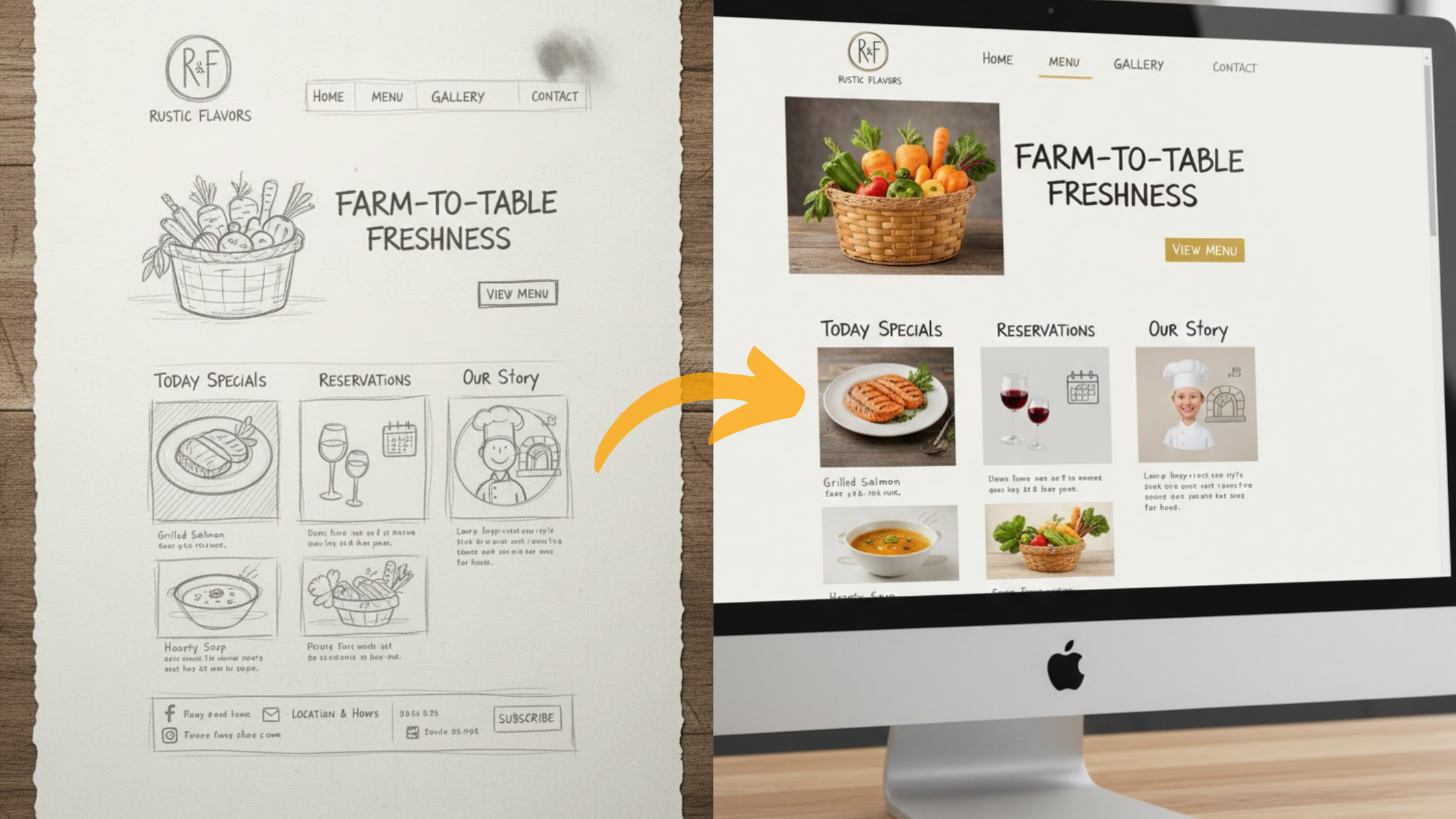
What if I told you that you could launch a fully functional website in less than an hour, without writing a single line of code? Sounds impossible, right? But that’s exactly what AI makes possible in 2025.
Building a website no longer requires months of design work or hiring expensive developers. AI-powered tools like Olitt AI are reshaping the game. In fact, studies show that over 65% of small businesses now use AI-driven website builders to get online faster, cheaper, and with professional results.
You don’t need a tech degree or years of experience. Instead, you answer a few simple questions about your brand or idea, and the AI takes care of the rest, layouts, copy, images, and even branding.
Be it a small business, a freelance gig, or a passion project, AI can turn your idea into a fully working website in no time.
This guide will walk you through everything: understanding the basics, choosing the right AI tool, and getting your site live. So, here’s the question: are you ready to turn your idea into a professional website today? Let’s dive in.
What Is an AI Website Builder?
AI website builders use smart tech to make sites for you. You describe what you want, like a blog for recipes or a shop for handmade crafts. The AI generates a full site with pages, designs, and content.
These tools save time. Traditional builders take days. AI does it in minutes. Plus, they adapt to your brand colors and style.
In 2025, AI goes further. It suggests SEO tweaks for better search rankings. It even creates mobile-friendly versions automatically.
Why Build a Website With AI in 2025?
Building a website used to mean weeks of coding, hiring developers, or struggling with complex tools. In 2025, AI flips the script. You no longer need to be a tech expert or have a big budget to get a professional site live. AI tools handle the heavy lifting so you can focus on running your business.
Here’s why using AI for website creation is a smart move this year:
1) Speed that matches your pace
Instead of waiting weeks for a developer, you can launch a polished website in just a few hours. AI instantly generates layouts, text, and images. All you do is review, tweak, and publish.
2) Serious cost savings
Traditional web design can cost hundreds or even thousands of dollars. AI builders cut that down dramatically. Many platforms start at less than $3/month, giving you professional results at a fraction of the price.
3) No tech skills required
If you can type a short description of your business, you can build a site with AI. Editing is simple thanks to drag-and-drop tools, perfect for beginners who don’t want to touch a single line of code.
4) Smart, built-in features
AI sites don’t just look good, they come with practical tools baked in. Think:
▫️SEO helpers so your business shows up on Google
▫️Contact forms to capture leads
▫️Analytics dashboards to track visitors and performance
With these features included, you don’t need to install dozens of extra plugins or apps.
Step-by-step: Build your site with AI
To be a website, all you need is a clear goal and a short description of your business. From there, the process flows smoothly: plan, generate, customize, and publish. The steps below will help you get started.
Step 1: Plan Your Website Goals
Before you jump into AI tools, take a moment to map out what you actually want your website to achieve. A clear vision saves time, reduces edits later, and ensures your site truly works for your business. Think of this step as creating the “blueprint” that your AI builder will follow.
Define your purpose

Ask yourself: Why am I building this website?
▪️Do you want to sell products or services?
▪️Are you sharing stories, blogs, or personal projects?
▪️Do you need a portfolio or resume site to showcase your work?
▪️Or is it simply about having an online presence so people can find your business?
Your main goal guides every decision that follows.
Identify your target audience

Who will visit your site? Write down a short profile of your typical visitor.
▫️Age group and interests
▫️What they need from you (e.g., buy, book, learn, connect)
▫️Problems you can solve for them
When you know your audience, you’ll know what tone, design, and content to use.
Decide on your key pages
At a minimum, most sites need:
▫️Home – your main pitch and call-to-action
▫️About – who you are and why you matter
▫️Contact – how people reach you
Depending on your purpose, you may also need:
▫️Shop/Services page
▫️Portfolio/Case Studies
▫️Blog or Resources
Choose your style and tone

Visual style affects first impressions. Decide if your site should feel:
?Fun and bold (great for creative brands or personal blogs)
?Clean and professional (ideal for businesses and portfolios)
?Minimal and modern (good for tech and startups)
Jot down 2–3 keywords that capture the “look and feel” you want.
Sketch a simple site map
You don’t need fancy software, a pen, and paper. Draw a box for each page and connect them with arrows. This quick sketch gives you a visual guide, making it easier for the AI builder to generate the right structure.
Step 2: Choose the Best AI Website Builder
The right AI website builder depends on your budget, goals, and experience level. In 2025, you have more options than ever. Some tools focus on design freedom, others on speed or eCommerce. The key is to choose one that makes sense for where you are right now.
If you want something simple and affordable, Olitt AI is one of the best picks. It balances speed, cost, and essential features, perfect for small businesses, freelancers, or anyone launching their first site.
Top AI Website Builders in 2025
Choosing the right AI website builder depends on your goals, budget, and how much control you want over design. Here’s a closer look at some of the best options available in 2025:
1️⃣Olitt AI

If you’re just starting or managing a small sales team, Olitt AI is one of the easiest and most affordable ways to boost productivity.
For just $19/user/month (billed annually), you get a full AI-powered sales companion with call intelligence, auto-CRM updates, and smart note-taking.
You can also add optional AI agents starting at $10/month for tasks like research or meeting prep. It’s built to be user-friendly, so you can simplify workflows quickly without tech headaches. Start with a $0 trial for 30 days.
2️⃣Wix

Wix is popular with creatives and professionals who want more flexibility. Plans start around $17/month, and its AI can design entire page layouts, generate images, and even suggest SEO improvements. If you’re looking for stylish templates with room to customize, Wix offers plenty of options while still giving you AI shortcuts to save time.
3️⃣Squarespace

Squarespace remains a favorite for portfolios, artists, and personal brands. Also priced from $16/month, its Blueprint AI tool helps you structure layouts, while smart content suggestions make it easier to polish your site’s copy.
All plans start with a 14-day free trial (no credit card required), after which you choose a plan. Pricing is lower when billed annually (with a discount on the first year)
The platform relies heavily on clean, elegant designs that highlight visuals, making it perfect for anyone in the creative industries.
4️⃣Hostinger

If budget is your biggest concern, Hostinger’s AI builder is a solid pick. Starting at just $2.99/month, it combines hosting with a simple AI quiz that sets up your site in minutes.
While it’s not as design-rich as Wix or Squarespace, it’s ideal for startups or small businesses that want a reliable and low-cost way to get online quickly.
Why Olitt AI stands out
✔Fast setup: Generate and publish a full website in minutes.
✔Affordable: One of the lowest-cost AI builders at under $3/month.
✔ E-commerce-ready: Sell online with built-in payments and product pages.
✔Flexible: Integrates with WordPress, so you can expand features later.
Step 3) Sign Up and Describe Your Site
Once you’ve picked your AI website builder, the next step is creating your account and giving the system a clear idea of what your site should be about.
This part usually takes just a few minutes, but it makes all the difference in the quality of your final website.
With Olitt AI, the process is straightforward:
- Create a free account

Head over to the Olitt AI builder. Signing up is quick; you only need a name, email, and password to get started.
- Enter your business details

Type in your business name and category. For example: “Brew Haven – Coffee Shop.” This helps the AI understand your industry and design needs.
- Add a few keywords
Include words or short phrases that describe what you do or what makes you unique. Think: “fresh brews,” “organic beans,” “local roasts.” These keywords guide the AI when generating your headlines, descriptions, and SEO tags.
- Choose your style or vibe

Decide how you want your brand to feel online. Do you want your website to feel cozy and welcoming like a neighborhood café, or sleek and modern like a trendy downtown spot? Your choice here shapes the fonts, colors, and layout that the AI suggests.
- Optional: Link social profiles
If you connect your social media, the AI can pull in your existing brand language, photos, and descriptions. This makes the site more personalized without extra effort from you.
Once you finish, the AI processes all this information behind the scenes. In seconds, you’ll have a draft website tailored to your business, ready for you to preview and refine—no fuss, no technical setup.
Step 4) Let AI Generate Your Site
This is the exciting part, the actual build. Once you’ve entered your details and hit “Build”, the AI takes over and does the heavy lifting for you. In just a few minutes, you’ll have a complete website draft ready to review.
Here’s what typically happens behind the scenes:
?️Homepage: The AI designs a clean layout with a hero image, a catchy headline, and a clear call-to-action button that guides visitors toward booking, buying, or contacting you.
?️About Page: A simple section that introduces your story or brand mission, written in plain, engaging copy.
?️Contact Page: A ready-made form linked to your email so visitors can reach out instantly.
With Olitt AI, the designs are always responsive, meaning your site automatically adjusts to look sharp on any screen, whether it’s a smartphone, tablet, or desktop. You don’t need to code or resize anything manually.
The best part? It all happens in under 5 minutes. Once the site is generated, you’re free to edit every part: swap images, rewrite headlines, or add extra sections. Think of it as getting a solid foundation instantly, then customizing the details to match your style.
Step 5: Customize Design and Content
Once the AI gives you a draft website, the next step is to make it truly yours. This is where you add personality, brand style, and the details that set you apart. The good news? You don’t need coding skills; modern AI builders use simple drag-and-drop tools that feel more like editing a slideshow than building a website.
Fine-tune your design
?️Colors & fonts: Most builders let you click on any section and instantly switch colors or font styles. Choose shades that match your brand logo or industry vibe.
?️Layout tweaks: Drag sections up or down, remove blocks you don’t need, or add new ones like testimonials, FAQs, or product grids.
?️Images & visuals: Upload your own photos for a personal touch, or let AI suggest stock-style images. Make sure they’re horizontal for inner pages and high-quality for a professional look.
Strengthen your content
?️Headings: Rewrite AI-generated headlines so they grab attention. Aim for short, bold lines like “Affordable Hosting, Trusted by Thousands” instead of generic text.
?️Bullet points: Use lists for your services or key benefits. They’re easier to skim and keep visitors engaged.
?️Paragraphs: Keep them short, 1–3 sentences max. Most readers scan, and walls of text drive them away.
Add engaging extras
◽Videos: Want to showcase a demo or client story? Most builders let you paste a YouTube or Vimeo link, and it will embed automatically.
◽Call-to-action (CTA): Make sure each page has one clear action: Book Now, Get a Quote, Sign Up.
Step 6: Add Essential Features
Your website is more than just words and images; it needs the right features to work for your business. Thanks to AI and built-in tools, you can add powerful functionality without writing a single line of code. Here’s what you should prioritize:
Forms: Capture and connect with visitors
Forms are a must-have for collecting emails, inquiries, or feedback.
◾Use a simple newsletter signup to build your mailing list.
◾Add a contact form so customers can reach you directly.
◾Keep forms short; name, email, and one message field are often enough.
SEO basics: Get found on Google
Search engines are still the main way people discover websites. AI builders like Olitt help by automatically adding:
◾Meta titles and descriptions to summarize each page.
◾Alt text for images so Google (and screen readers) understand your visuals.
◾Mobile-friendly layouts, which are a ranking factor.
These tweaks happen in the background, but they make a big difference in visibility.
Analytics: Understand your audience
You can’t improve what you don’t measure. Analytics tools show you who’s visiting, where they come from, and what they do on your site.
?Connect Google Analytics or use built-in dashboards.
?Track popular pages and visitor behavior to see what’s working.
?Use data to guide updates, focus on content people actually read.
For online shops: eCommerce essentials
If you’re selling products or services, add shopping carts and payment options.
▪️Olitt’s eCommerce tools make it easy to set up products, prices, and secure checkout.
▪️Customers can browse, add to cart, and pay without friction.
▪️Security is built-in, so you don’t need to worry about handling sensitive data.
Step 7: Optimize for Search Engines
Having a beautiful website is great, but it won’t help if no one can find it. That’s where search engine optimization (SEO) comes in. In 2025, AI will make SEO simpler by handling much of the technical setup for you. Your job is to make sure the content speaks to both Google and your audience.
Here’s how to optimize your AI-built site for search:
1) Use keywords naturally
Think of the words your customers type into Google. For example, a coffee shop owner might target “best coffee in town” or “affordable café near me.”
?Place these phrases in your headlines, page titles, and descriptions.
?Don’t stuff keywords; use them naturally in sentences, just like you’d talk to a customer.
2) Keep your site fast
Search engines reward fast-loading websites. Visitors expect the same.
?AI builders like Olitt automatically compress images and streamline code for speed.
?Avoid oversized images or too many plugins that slow things down.
?Test your site on mobile to make sure it loads in under 3 seconds.
3) Submit your site to Google
Most AI platforms include built-in tools that connect your site to Google Search Console.
⚪This tells Google your website exists.
⚪It helps you track performance, fix issues, and see which keywords bring in traffic.
Step 8: Test and Launch
Preview on different devices. Click every link. Fix glitches.
Satisfied? Publish. Buy a domain like yourname.com; Olitt offers free ones.
Go live! Share on socials.
Step 9: Maintain and Grow Your Site
Your work doesn’t end at launch. Update content weekly.
Use AI for:
▫️Fresh blog posts.
▫️Performance checks.
Monitor traffic. Adjust based on what works.
Conclusion:
In 2025, building a website doesn’t need to drain your time, money, or energy. With AI, you can launch a professional site in hours, not weeks, complete with smart tools for SEO, forms, and analytics.
If you’re ready to focus on growing your business instead of wrestling with code, Olitt AI is your best starting point. It’s fast, affordable, and built for entrepreneurs who want results without the tech stress.