
Have you ever wanted a website but didn’t know where to begin? Words like “coding” or “web development” can make it sound hard.
Hiring experts can also cost a lot of money and take too much time.
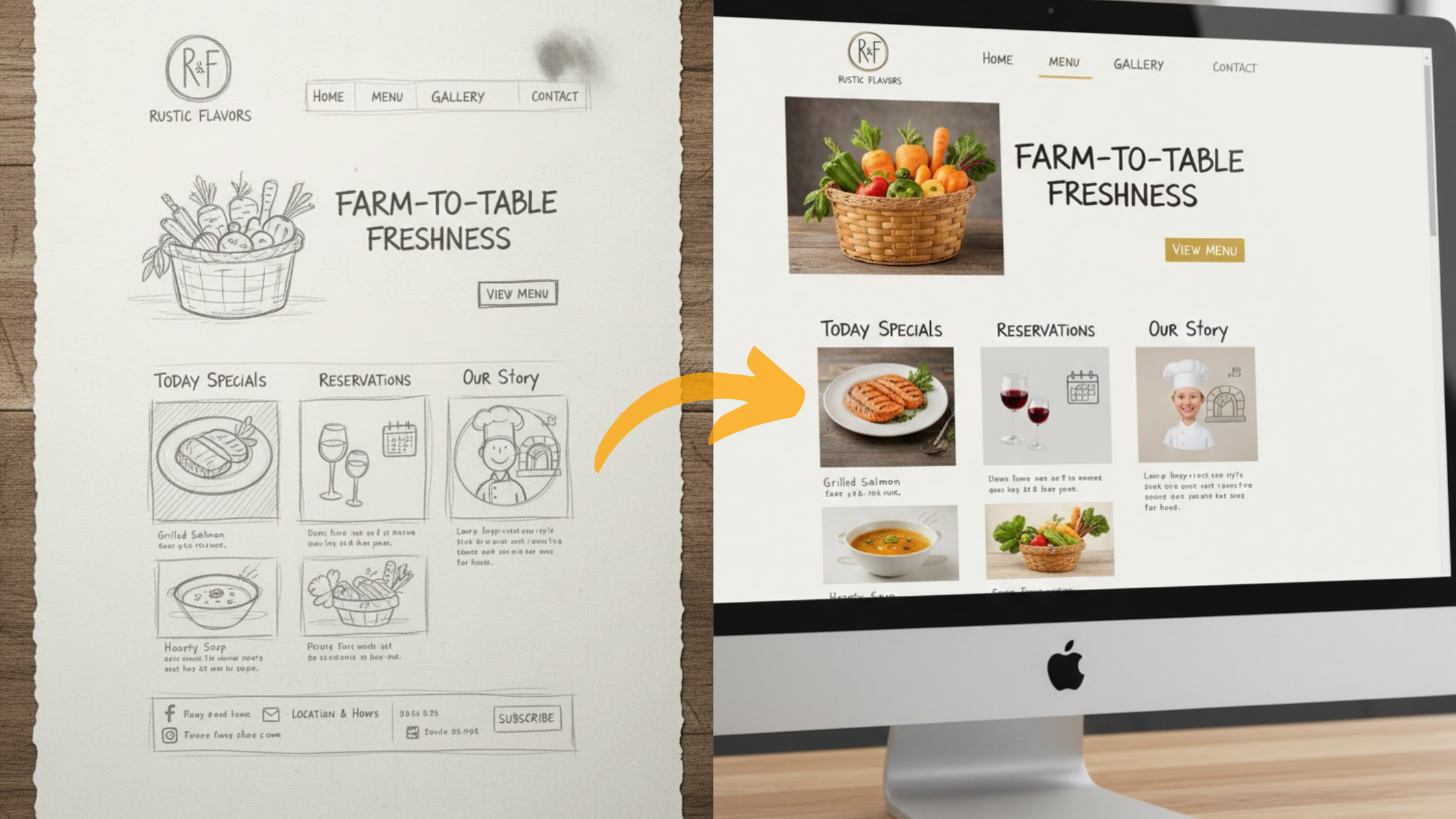
Think of it this way: you describe your business or idea in a few simple sentences, and within minutes, a complete website is ready for you to customize.
That’s the power of modern AI website builders. They take care of the technical work, so you can focus on your ideas and creativity.
In this guide, you’ll learn about nine easy to use AI website builders for beginners in 2025.
Each one is simple to use, affordable, and helps you turn your idea into a website fast.
Olitt tops our list because it’s perfect for anyone starting out on a small budget.
Here’s what you’ll learn:
- What AI website builders are and how they work
- A detailed look at nine of the best options in 2025
- Tips on choosing the right builder for your goals
- The pros and cons of using AI website tools
Let’s get started and turn your website dream into reality.
What Is an AI Website Builder and How Does It Work?
An AI website builder uses artificial intelligence to help you create a complete website quickly, even if you have no design or coding experience.
Think of it like having a smart assistant that designs your website for you.
You simply tell it what you need, maybe a blog, a restaurant site, or an online store—and the AI automatically selects the right layout, colors, and features.
Here’s how it typically works:
- Describe your website. For example, “A cozy coffee shop site with a menu and contact form.”
- AI builds the design. The system creates a layout that matches your description, with color themes and sample text.
- Customize easily. You can change pictures, move blocks around, or edit text using a simple drag-and-drop editor.
- Publish instantly. Once you’re happy, click publish, and your site goes live—often with free hosting included.
For most beginners, this process turns weeks of work into minutes. You get a professional-looking site without paying hundreds of dollars to a developer.
One Olitt user shared, “I launched my freelance site in under 20 minutes. The AI captured exactly what I wanted.”
What Is AI in Web Design?
AI in web design goes beyond simple templates.
It uses data from thousands of websites to make smart design and content choices automatically.
Modern AI tools can now write headlines, generate custom images, suggest layouts that load faster, and even adjust how a page looks depending on who’s visiting it.
In 2025, this technology is getting even smarter. Expect features like real-time SEO suggestions, personalized content for visitors, and AI-generated graphics that match your brand style.
Olitt, for example, offers an AI content generator that writes product descriptions and blog posts tailored to your business tone.
Using AI in web design saves time, reduces guesswork, and helps you create a website that looks great and performs well across devices.
9 Easy to Use AI Website Builders for Beginners in 2025
We tested nine of the best AI website builders based on speed, ease of use, design quality, and pricing. Each one fits different needs, whether you’re starting a personal blog, a business site, or an online store.
1) Olitt: Best for Beginners on a Budget
If cost is your biggest concern, Olitt is the perfect starting point. Its AI builder can create a website in seconds.
Describe your business—like a bakery or portfolio—and Olitt automatically builds a mobile-friendly site.
You can drag elements, add forms, or set up an online shop without touching any code.
Key Features:
- AI content generator for blogs and product descriptions
- Free hosting and domain perks
- Built-in SEO tools for faster ranking
Pricing: Free forever. The Pro plan starts at $9/month for more storage and no ads.

Pros: Extremely beginner-friendly, no tech skills required.
Cons: Smaller template library compared to others.
2) Wix: Best Overall Website Builder
Wix remains one of the most popular website builders worldwide, and its AI tool (ADI) makes it even easier.
You simply answer a few questions about your website goals, and Wix designs a complete site, including content and images.
Highlights:
- AI text writer for pages and emails
- Image enhancer that improves visuals
- App store with booking and payment features
Pricing: Free plan available; paid plans start at $17/month.

Pros: Endless design flexibility and growth options.
Cons: Can feel overwhelming for total beginners.
3) 10Web: Best for WordPress Users
10Web is great if you love WordPress but don’t want the technical setup. It can build a new site or clone an existing one into a WordPress version.
Key Features:
- AI site cloning
- Automatic SEO and performance optimization
- Works with Gutenberg editor
Pricing: Starts at $10/month, including hosting and domain.

Pros: Fast setup for WordPress; excellent for bloggers.
Cons: Slight learning curve for new WordPress users.
4) Jimdo: Best for New Online Stores
Jimdo’s AI builder is designed for people starting eCommerce businesses. It can create a complete online shop within minutes.
Top Features:
- AI-generated product descriptions
- Integrated payment gateways
- Mobile-friendly store designs
Pricing: Free plan available; paid plans start at $11/month.

Pros: Affordable and simple eCommerce setup.
Cons: Fewer design templates for non-store websites.
5) Bookmark AIDA: Best for Industry-Specific Websites
Bookmark’s AIDA AI asks you about your industry—like restaurants, real estate, or photography—and builds a website tailored to your field.
Highlights:
- Niche-specific templates
- SEO optimization built in
- Business analytics dashboard
Pricing: Starts at $12/month.

Pros: Smart personalization for your business type.
Cons: Limited flexibility if you change industries later.
6) TeleportHQ: Best for Aspiring Designers
TeleportHQ is perfect for people who want to learn design or transition from no-code tools to coding.
Features:
- Converts sketches or text prompts into layouts
- Real-time collaboration
- Exports editable code
Pricing: Free tier available; Pro starts at $18/month.

Pros: Great for designers and developers in training.
Cons: Too advanced for absolute beginners.
7) Hostinger AI Website Builder: Best for Complete Beginners
Hostinger offers one of the simplest AI website builders on the market.
It guides you through a few questions, generates a design, and hosts your site automatically.
Key Features:
- One-minute website generation
- AI logo and text generator
- Built-in analytics and heatmaps
Pricing: Starts at $2.99/month, with free domain included.

Pros: Affordable, fast, and beginner-proof.
Cons: Limited design control for advanced users.
8) Gamma: Best for Personal Projects
Gamma helps turn simple ideas, slides, or notes into clean web pages.
It’s ideal for portfolios, resumes, or creative projects.
Features:
- Turns documents into web pages instantly
- Creative templates
- Simple sharing options
Pricing: Free basic plan; $10/month for premium.

Pros: Quick and fun to use.
Cons: Not ideal for eCommerce or multi-page sites.
9) Elementor AI: Best for WordPress Beginners
Elementor AI adds intelligence to the popular WordPress page builder.
It can generate designs, content, and images automatically.
Features:
- AI image and text generation
- Full theme builder integration
- Affordable credit-based pricing
Pricing: From $3.99/month.

Pros: Enhances WordPress flexibility; budget-friendly.
Cons: Requires WordPress setup; AI credits can run out fast.
Comparison Table
| Website Builder | Best For | Starting Price |
| Olitt | Beginners on a Budget | Free |
| Wix | All-Around Performance | $17/month |
| 10Web | WordPress Users | $10/month |
| Jimdo | eCommerce Stores | $11/month |
| Bookmark AIDA | Industry-Specific Sites | $12/month |
| TeleportHQ | Designers and Developers | Free |
| Hostinger | Complete Beginners | $2.99/month |
| Gamma | Personal Projects | Free |
| Elementor AI | WordPress Beginners | $3.99/month |
What Makes a Great AI Website Builder?
The best easy to use AI website builders are also affordable and flexible.
Look for tools that go beyond templates and actually personalize your website for your goals.
Strong customer support, built-in SEO tools, and scalability are also key factors—especially if you plan to grow your business.
Olitt, for example, stands out for affordability and simplicity, while Wix is great for all-around performance.
Pros and Cons of AI Website Builders
Pros:
- Build a professional site in minutes
- Free or low-cost plans available
- No coding or design skills required
- AI helps with SEO and layout optimization
Cons:
- Designs may look similar if you skip customization
- AI-generated text can sound generic
- Some features require paid upgrades
Overall, easy to use AI website builders are ideal for quick, low-cost launches. You can always customize later as your skills or business grow.
Frequently Asked Questions
Are AI website builders free to use?
Many offer free versions, including Olitt and Hostinger. Paid plans usually start around $3–$10 per month for more features.
Can I switch builders later?
Yes, most let you export your site’s content. WordPress-based tools like 10Web make this especially easy.
What’s new in AI web design for 2025?
Expect better personalization, improved image generation, and more eco-friendly hosting options powered by AI optimization.
Do I need coding skills?
No. All tools here are beginner-friendly and handle the technical work for you.
Ready to Build Your Website?
You now have everything you need to create your own website in 2025—no coding, no stress.
If you’re starting small or on a tight budget, try Olitt’s AI Builder for free. Within minutes, you could have your website online and ready for visitors.
What’s stopping you? Take the first step today and bring your online idea to life.